The full record · $29 for the first 100 families, one time

The POA Ledger

The POA Ledger is a complete, organized record of your parent's money, showing what came in, what went out, what you paid back to yourself, and a simple page the family can read. It helps you care for Mom or Dad with a clear head, and it is ready if the bank, an attorney, a court, Medicaid, or a family member ever asks for an accounting.

$47 $29

The $29 price is only for the first 100 families, and after that the Ledger is $47. There is no timer, and you can add the Estate Handoff Pages for $19 in the cart.

This is a one-time purchase, and the $29 price is only for the first 100 families. Payhip, our checkout partner, handles the card and the sales tax, so your card details never reach us. If a file does not work or is not what was described, email us within 30 days and we will fix it or refund it. You keep the free kit either way. Refund policy.
A sample of the POA Ledger, with the register, the reimbursement page, and a reconciled month. Not a real family.

Who it's for

If you're here, you're probably taking care of Mom or Dad.

You may have a job and a family of your own, and now Mom or Dad can no longer manage the checkbook, or simply should not have to. You hold the power of attorney or soon will, and what you want most is their money in order and your family still close.

The POA Ledger simply records what already happened, in plain words, so another person can follow it without a bank password. It is not a monitoring app or a will, and it will never tell you which account to use.

A look inside

Example pages from the workbook and the guide.

The names and the numbers in these pictures are example data for a fictional family. Your file starts blank.

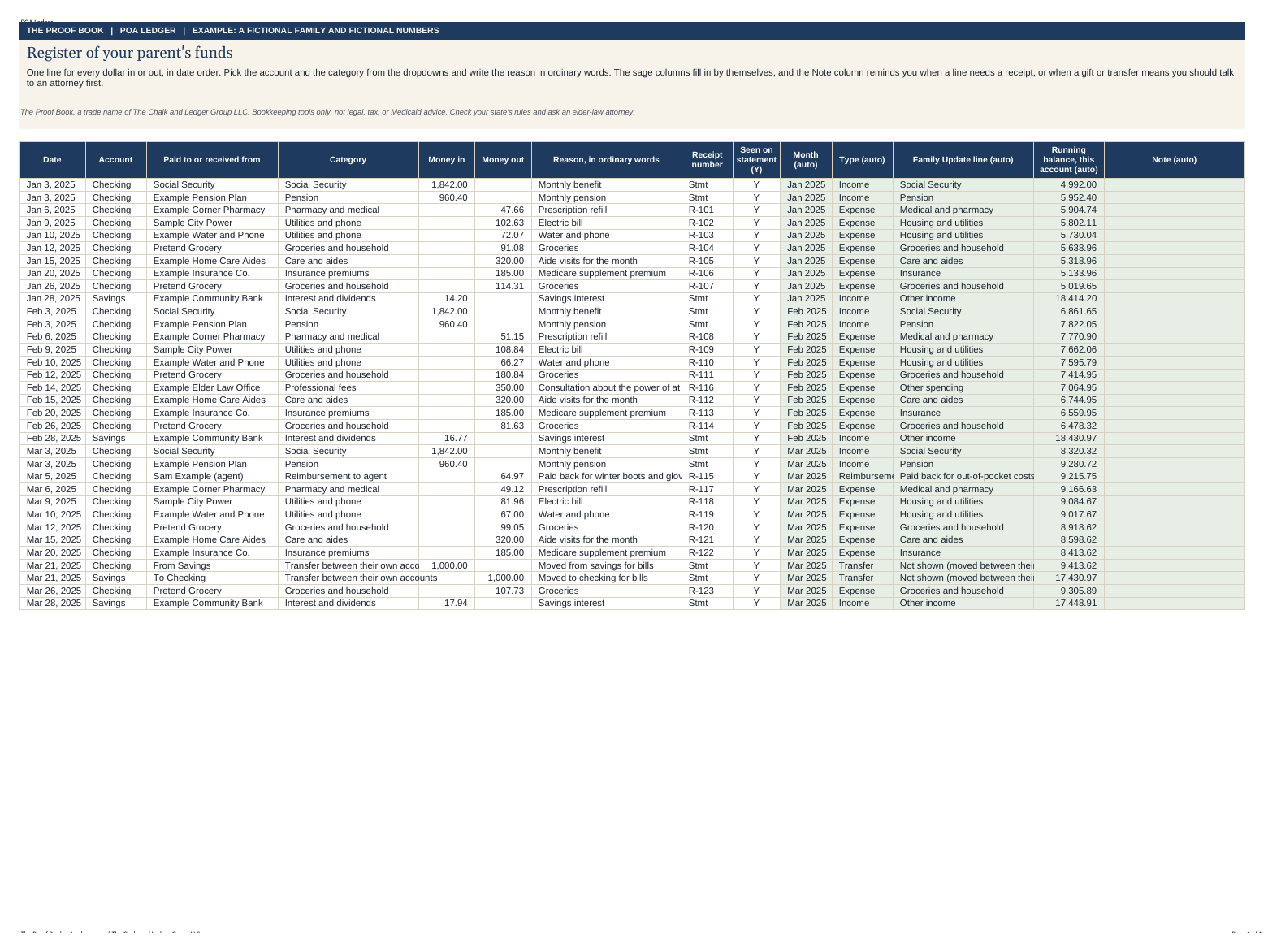
Example register tab with fictional transactions for a parent
The Register tab, filled with example data. Every name and number is invented.
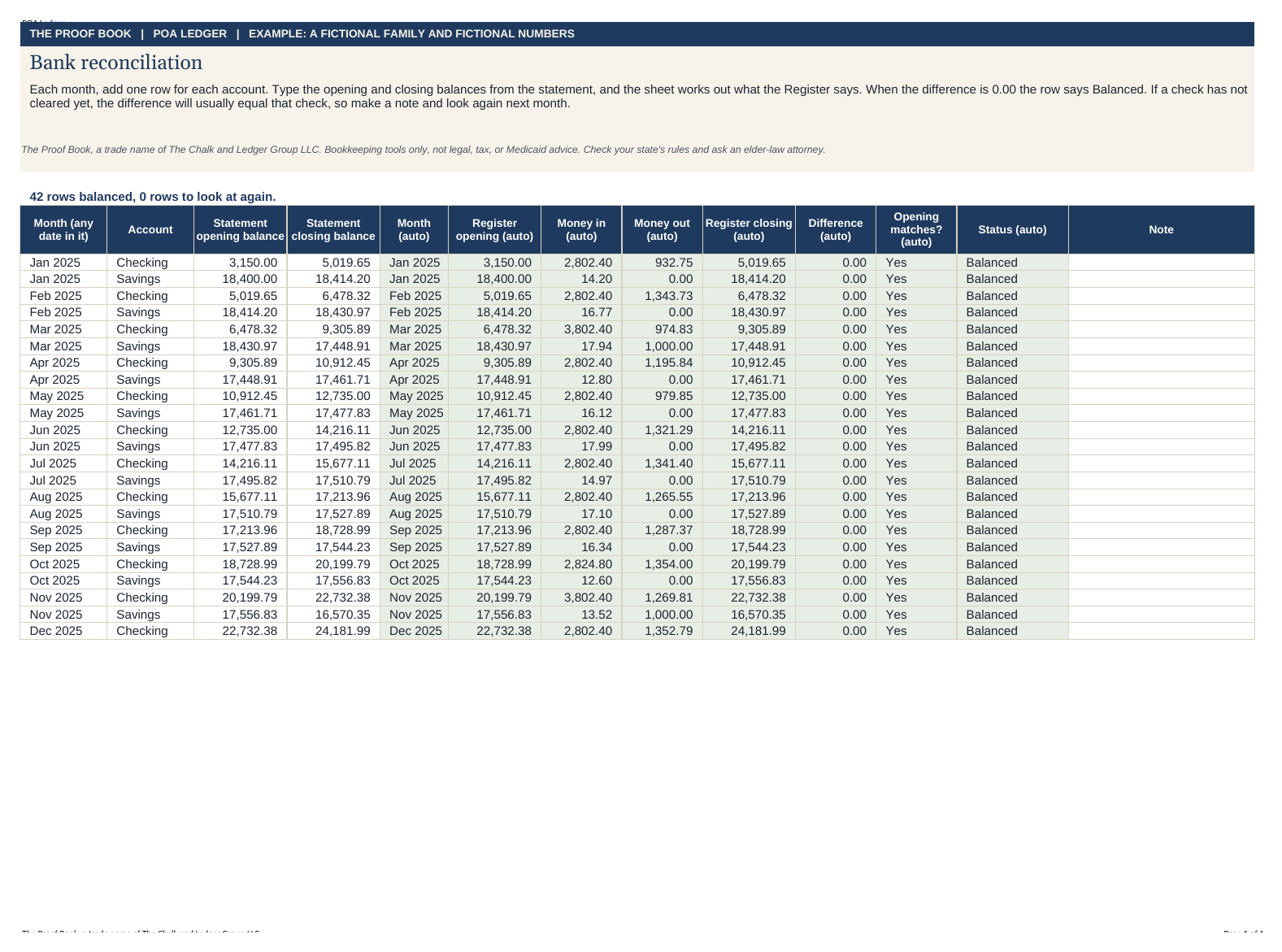
Example reconciliation tab showing a balanced month
The Reconciliation tab, with example data. A month is done when it says Balanced.
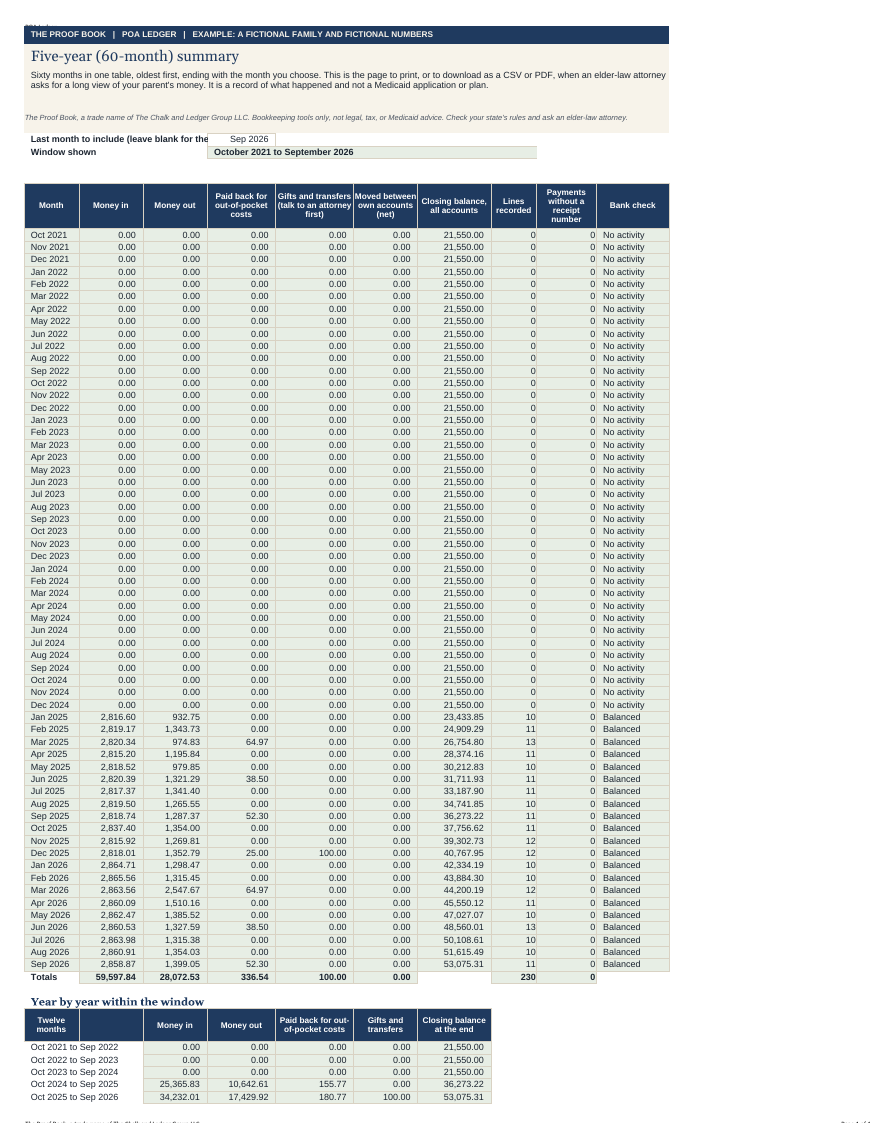
Example five-year summary with sixty months of fictional totals
The Five-Year Summary, with example data. Sixty months sit in the workbook you download.
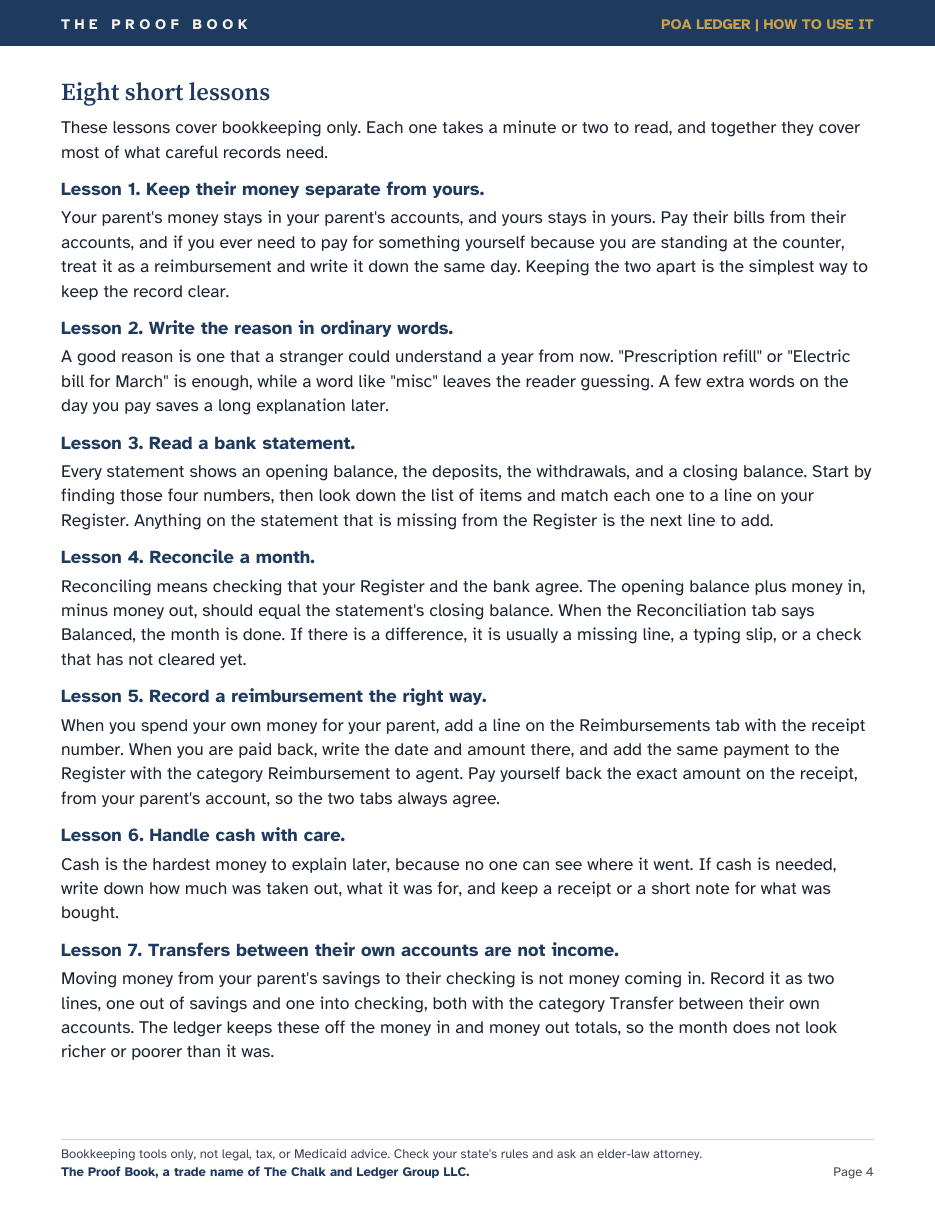
A page of the How to Use guide showing written bookkeeping lessons
Eight short lessons, written in the How to Use guide. They are pages you read, not a video.

What's inside

Eleven parts, in a workbook of 14 tabs.

The workbook opens in Excel and in Google Sheets. The tabs are Start Here, Accounts, Register, Reimbursements, Receipts, Reconciliation, Family Questions, Gifts and Transfers, Caregiver Hours, Monthly Summary, Family Update, Annual Summary, Five-Year Summary, Lists. You keep the file in your own account, and nothing in it is sent to us.

  1. 01

    Register of the parent's funds

    Every dollar in and every dollar out, with a running balance and the reason in ordinary words.

  2. 02

    Your reimbursements, on their own tab

    What you paid from your own pocket, what was repaid, and what is still owed, checked against the register.

  3. 03

    Receipt index

    A number, a vendor, and where the paper lives, with a check that the number appears on a line.

  4. 04

    Bank reconciliation

    One row per account per month. It says Balanced when the register matches the statement.

  5. 05

    Family question log

    Who asked, what they asked, and what you shared, so you do not have to hold it in your head.

  6. 06

    Gifts and transfers

    A separate page with a hard stop: talk to an elder-law attorney before money moves as a gift.

  7. 07

    Caregiver-hours log

    Hours, if you choose to track them. The log is a record, not permission to pay yourself.

  8. 08

    Annual summary

    Every category for each month of a year, with totals and month-end balances.

  9. 09

    Five-year summary

    Sixty months in one table, with year-by-year and category totals. You can print that sheet or download it. It is a record, not a Medicaid plan.

  10. 10

    Printable pages

    Twelve printable pages, from the cover through the five-year page, for a kitchen table or a folder in the desk.

  11. 11

    Eight short written lessons

    The How to Use guide includes eight short lessons on bookkeeping. They are written pages, not a video.

The eight written lessons

  1. Keep their money separate from yours.
  2. Write the reason in ordinary words.
  3. Read a bank statement.
  4. Reconcile a month.
  5. Record a reimbursement the right way.
  6. Handle cash with care.
  7. Transfers between their own accounts are not income.
  8. When the question is a decision, ask an attorney.

What it is not

It records what happened, and it leaves the decisions to you and your attorney.

  • It is not a power of attorney, a will, or a trust.
  • It does not say whether to give a gift, add a name to an account, or pay yourself for care.
  • It does not plan Medicaid. The five-year summary is a record of what you entered, not an application.
  • It does not give tax advice. A CPA does that.
  • We cannot promise that a bank, a court, or a family member will accept your file. An elder-law attorney can tell you what your state and your document require.

The Consumer Financial Protection Bureau's guide for agents is the public starting point for the duties. When the question is a decision rather than a receipt, bring your records to an elder-law attorney.

If you want the estate pages and the yearly tools as well, The Complete Proof Book is $59 for the first 100 families ($117 item by item, with every new download we add later at no extra cost). The Estate Handoff Pages are also $19 on their own.

Questions, before you decide.

What do I get when I buy the POA Ledger?

You get a workbook with 14 tabs that opens in Excel and in Google Sheets, an example workbook filled with fictional months, twelve printable pages, and a How to Use guide with eight short written lessons. The Five-Year Summary tab holds sixty months. If a file does not work or is not what was described, email us within 30 days and we will fix it or refund it.

Is my parent's information uploaded to The Proof Book?

No. You open the workbook in Excel, or you import it into your own Google account. Your parent's receipts and statements stay in your files. We do not ask for full account numbers, Social Security numbers, or dates of birth.

Will the POA Ledger make me compliant with my state's law?

No, and we cannot say that. Many states expect an agent to keep a record of receipts, disbursements, and transactions, and the Consumer Financial Protection Bureau tells agents to keep good records, but whether your file is enough for your document, your bank, or a court is a question for an elder-law attorney.

Is the price of the POA Ledger a subscription?

No. The POA Ledger is a one-time purchase. The price is $47. The $29 price is only for the first 100 families, and after that the price is $47. There is no timer.

Can I get a refund on the POA Ledger?

Yes. Email [email protected] within 30 days if a file does not work or is not what was described, and we will fix it or refund it. You do not have to explain, and you keep the free Family Update Kit. The refund policy has the rest.

The $29 price is only for the first 100 families, and after that the Ledger is $47. You can also begin with the free Family Update Kit if you want one page before the full workbook.